Showing posts with label how to. Show all posts

Sunday, July 28, 2013

MediaTek Device Dead Phone Usb Flashing/Flash any MediaTek device With Sp Flash Tool And Rom Dump

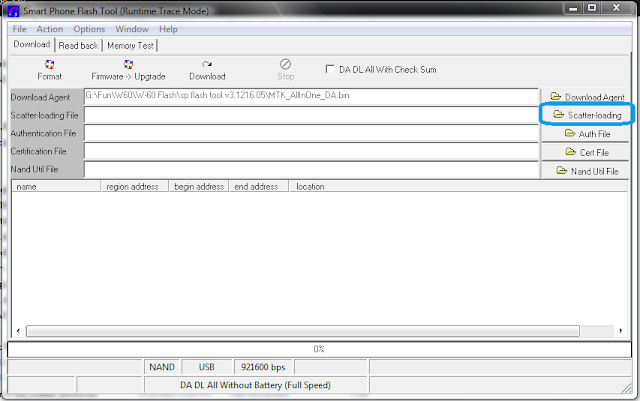
Dead phone or alive,Usb flashing a MediaTek device is a very simple process,At first Download SP Flash Tool and take a rom dump of your mediatek device or download it from the internet,Now,open SPFlashTool and click on Scatter Loading >>>>

MediaTek Device Dead Phone Usb Flashing/Flash any MediaTek device With Sp Flash Tool And Rom Dump

Saturday, July 27, 2013

How To Install ADB Driver For Any Android Device (Media Device Driver)

At first make sure that the driver is installed or not,If the driver is installed and your android device is connected to your computer via usb cable than in "My Computer" your device will be shown , Like this >>>


If the device is shown than you don't need to install the driver ,it's already been done,if it isn't there than no problem just download this file (Download the latest one and the one for your version of windows x86 means 32bits and x64 mean's 64bits) and install it,read the instructions and do as it says.That's it ! you are done, For Details keep going >>>>


Friday, March 29, 2013

[ After Root ] Reverse Tether For Android 4.x.x Device [ Frome Pc to Device Via Usb ]


Yes you have seen it right ! you can connect your phone to internet via usb cable when your computer is connected to the internet and android device is not,Lets see how>>>

Thursday, March 28, 2013

Tuesday, March 26, 2013

How to Install C.W.M to Symphony w60 [ Tested ]


To root or make a nano droid backup you would be needing to install the C.W.M recovery to your phone and it's a 100% successful and it won't void your warranty + you can make a rom backup to your phone and when warranty is needed or you face any problem you can just restore from backup,so lets go for it>>>

Thursday, January 31, 2013

How To Root Symphony Explorer W-60/Walton F1 Or Any Android 4.0.4 MediaTek MT6575 Device – Complete Tutorial (Tested)

Root symphony w60/Walton F1


To root your Symphony Explorar W60 you would be needing these >>>


  • Your Symphony W60 PHN And It's Data cable
  • A Computer Running on Windows Os
  • 10-12mb Data Downloaded From Internet 


          (any damage you do to your phn is not my fault may be you did something wrong )

Lets Get Started .....